
CUNY SPS Open Road

Where We're Going

OpenLab and LinkedIn: How to Use Both for Professional Growth

When it comes to building your professional presence online, LinkedIn is usually the first platform that comes to mind, but don’t overlook OpenLab! Together, these two tools can work hand-in-hand to help you showcase your work, connect with others, and take your goals further.

Here’s how to make the most of both:

Use LinkedIn to Network, Use OpenLab to Show the Work

LinkedIn is great for making connections, listing accomplishments, and signaling your career goals. But it doesn’t give you much space to really show what you’ve done. That’s where OpenLab comes in.

  • Use your OpenLab portfolio site to go deeper: post projects, reflections, and examples of your work
  • Then add the link to your OpenLab site on your LinkedIn profile in your bio, your featured section, or under a project
  • If you’re applying for jobs or internships, this gives recruiters more than just bullet points it gives them real evidence of your skills

Tell a More Complete Story

On OpenLab, you can:

  • Reflect on how you built a project
  • Share learning experiences
  • Talk about challenges you overcame

These kinds of details help future collaborators or employers understand how you think, not just what you’ve done. It’s a great way to add personality to the professional version of you that lives on LinkedIn.

Keep Both Updated

Even a quick blog post update on OpenLab can go a long way. If you start using both platforms regularly even in small ways you’ll build a digital presence that feels both professional and human.

Want help getting started with your portfolio site on OpenLab? Email us at openlab@sps.cuny.edu.

Photo Credit: “apollorecord” by Laurinko Sattumaa via Flickr under the license CC BY-NC-SA 4.0.

The Best Ways to Stay Organized on OpenLab

OpenLab isn’t just a platform for building portfolios or joining groups but it can also be a great tool for staying organized. Whether you’re managing coursework, group projects, or just trying to keep track of your digital life as a student, there are small things you can do on OpenLab that help everything feel a little more in control.

Here are a few easy ways to use OpenLab to stay on top of your work:

1. Use Your Site Like a Digital Hub

If you’ve created your own site whether it’s a portfolio, project, or group space you can turn it into a central place for all your materials.

  • Keep a private or public “To-Do” page to track your weekly tasks
  • Use blog posts or pages to write project updates, meeting notes, or class reflections
  • Create a “Resources” page with links, PDFs, or reading materials you return to often

2. Join (and Revisit) Your Groups

If you’re part of a course, club, or project on OpenLab, don’t forget to check in on those groups regularly. Many include:

  • Discussion posts
  • Shared documents
  • Announcements or meeting notes

It’s a good idea to bookmark your groups or keep them listed somewhere easy to access. You can easily view the groups you’ve joined from your OpenLab user profile. Visit the homepage and select any of the “My Profile” links, where you can view all groups you’ve joined by type:

3. Organize with Pages and Menus

When you create a site, you can keep it clean and navigable by using:

  • Pages for long-term content (like “Projects” or “Class Notes”)
  • Menus to group related content together, like coursework by semester or topic
  • Sub-pages (nested pages) to keep things even more tidy

4. Use Categories and Tags for Posts

If you’re writing blog posts regularly, organize them using categories and tags.

  • Categories = the big topics (like “Coursework,” “Reflections,” or “Group Updates”)
  • Tags = specific keywords or themes that pop up across posts

This makes it much easier to find content later and to present a polished, structured site.

5. Schedule Posts or Save Drafts

Working on a blog post or update but not ready to publish?

  • You can save it as a draft and come back later
  • Or schedule it to publish automatically on a future date

Perfect for planning ahead during busy weeks.

6. Keep It Simple

You don’t have to use every feature on OpenLab to be organized just a few small tweaks can go a long way. Try picking one thing to implement this week (like setting up a “To-Do” page or organizing your posts), and build from there.

Have questions or want help getting started?
Reach out to the OpenLab team at openlab@sps.cuny.edu

You’ve got the tools, now make them work for you.

Photo Credit: “untitled” by Pawel Czerwinski via Unsplash under the license CC BY-NC-SA 4.0.

How OpenLab Can Help You Land a Job

You might not think of OpenLab as a job-hunting tool at first but it can be. With the right setup, your OpenLab site can become a professional portfolio, a place to showcase your work, and a way to stand out to employers in a crowded field.

Here’s how to make OpenLab part of your job search toolkit:

Build a Portfolio That Speaks for You

When you apply for jobs, employers often want to see more than just a résumé. They want to see how you think, what you’ve done, and how you present yourself.

On OpenLab, you can:

  • Create a personal site that highlights your skills and experiences
  • Upload writing samples, design work, research projects, or presentations
  • Organize your content into pages (like “Work Samples” or “Certifications”)
  • Add reflections or short posts that explain the story behind your work

You don’t need to have everything figured out. Start with what you have, and build from there. Even small steps count.

Show Growth and Learning

OpenLab is a great space to show that you’re someone who’s always learning. Use it to:

  • Blog about what you’re learning in class
  • Share takeaways from a recent project or internship
  • Document progress on personal or academic goals

This kind of reflective content shows initiative and critical thinking—two things employers love.

Boost Your Visibility (and Your SEO!)

One major bonus? Hosting your work on OpenLab’s .EDU domain gives you a valuable SEO (Search Engine Optimization) boost.

Why does that matter?

  • .EDU sites are seen as high-trust by search engines
  • Content hosted on .EDU domains is more likely to appear higher in search results
  • It makes it easier for potential employers (and collaborators) to find your work online

In short: your OpenLab site doesn’t just live quietly in a corner, it helps put you on the map.

Use It to Network Smartly

Your OpenLab profile is public (if you want it to be), which means you can link it directly on:

  • Your résumé
  • Your LinkedIn profile
  • Job applications that ask for a portfolio

It gives hiring managers an easy way to get a better sense of who you are—not just what you’ve done.

Take Ownership of Your Online Presence

Having a clean, well-organized, and thoughtful digital space shows that you’re intentional about your work. Plus, it gives you something to point to in interviews when they ask,

“Can you tell us about a project you’re proud of?”

You can say: Yes actually, I’ve shared that on my OpenLab site. Let me share the link with you.

Not Sure Where to Start?

Start simple. Create a basic portfolio site with:

  • A short “About Me” page
  • A page or two with samples of your work
  • A contact section
  • A blog post reflecting on something you’ve learned recently

You can always keep building as you go.

Your site. Your story. Your edge in the job search.

Photo Credit: “Savoy Drive” by grpmpk via Flickr under the license CC BY-NC-SA 4.0.

Fall 2026 Support Schedule

Welcome back, and happy fall!

A new semester is here, and we’re excited to support everyone teaching, learning, and creating on OpenLab this fall. Whether you’re building a new site, updating an existing one, or just have a few questions along the way, we’re here to help.

Get Support

We’re available on Tuesdays from 5:00–6:00 p.m.; you can book ahead of time or drop in.

For the planners, here are this semester’s support dates:

  • September 1
  • September 8
  • September 15
  • September 22
  • September 29
  • October 6
  • October 13
  • October 20
  • October 27
  • November 3
  • November 10
  • November 17
  • November 24

If our scheduled hours don’t work for you, don’t worry. Email us at openlab@sps.cuny.edu or reach out to our OpenLab Manager Jesse Rice-Evans at jesse.riceevans@cuny.edu and we’ll do our best to find another time that fits your schedule.

We look forward to working with you this semester!

Photo Credit: “Hubble Space Telescope Celebrates 25 Years of Unveiling the Universe” by NASA, ESA, the Hubble Heritage Team (STScI/AURA), A. Nota (ESA/STScI), and the Westerlund 2 Science Team, April 24, 2015 via Flickr under the license CC BY-NC-SA 4.0

Summer 2026 on the OpenLab

Welcome folks and happy summer!

We’re excited to support those of you teaching, learning, and working on the OpenLab this summer. New WordPress updates, plugins, and updated templates with improved accessibility features are coming your way soon!

Get Support

We’re available by appointment on Tuesdays from 5-7 p.m.

For the planners, that’s the following dates:

  • June 9
  • June 16
  • June 23
  • June 30
  • July 7
  • July 14
  • July 21
  • July 28
  • August 4
  • August 11
  • August 18
  • August 25 

Please email us at openlab@sps.cuny.edu or OpenLab Manager Jesse Rice-Evans jesse.riceevans@cuny.edu to schedule!

As always, if our scheduled times do not work for you, please reach out and we can find alternative times to get together!

Photo Credit: “abstract” by CubaGallery, March 28, 2009 via Flickr under the license CC BY-NC-SA 4.0.

Using the Editoria11y Accessibility Checker to Improve Your Content

Did you know that OpenLab offers a built-in accessibility checker?

The Editoria11y Accessibility Checker works directly in the WordPress editor. As you create or update content, it scans your page and highlights potential accessibility issues.

It may flag things like:

  • Missing alt text on images
  • Links that are not descriptive
  • Low color contrast
  • Skipped heading levels

Instead of overwhelming you, it provides clear explanations and suggestions so you can fix issues quickly.

You do not need to be an expert in accessibility to use it. The goal is to make small improvements over time.

Making your site more accessible helps ensure that your work can be experienced by as many people as possible. It also reflects thoughtful and professional digital practice.

Looking for more information? We got you!

Photo Credit: “abstract” by Carl Dunn, September 2017 via Flickr under the license CC BY-NC-SA 4.0.

Simple Accessibility Practices You Can Start Using Today on OpenLab

Accessibility does not always require special tools. Often, it starts with simple habits.

Here are a few easy practices you can apply to any OpenLab site:

  • Add clear alt text to every image describing what is shown
  • Use headings in order, starting with Heading 2 under your title
  • Avoid using color alone to communicate meaning
  • Write descriptive link text such as “View the final project report” instead of “Click here”
  • Break long paragraphs into shorter, readable sections

These small changes improve usability for screen reader users, mobile readers, and anyone scanning your content quickly.

Accessibility is about inclusion. When we design content with care, we create a more welcoming OpenLab community.

If you have questions about accessibility features or best practices, the OpenLab team is here to help.

Looking for more information? We got you!

Photo Credit: “abstract” by Cuba Gallery, June 2010 via Flickr under the license CC BY-NC-SA 4.0.

Making Your Site More Accessible with the Editoria11y Plugin

Did you know there’s a plugin on OpenLab that can quietly help make your site better for everyone?

It’s called the Editoria11y Accessibility Checker, and it works right inside the WordPress editor. As you build or update pages and posts, this plugin flags small issues that might make your content hard to access like missing alt text, unclear link labels, or color contrast problems.

You might also start seeing this plugin automatically when creating a new OpenLab site. Our upcoming site templates will have the Editoria11y Accessibility Checker already activated, making it easier for new sites to begin with accessibility in mind from the start.

What’s nice is that you don’t have to be a designer or a developer to use it. The plugin gives helpful explanations in real time and shows you where you can make quick changes. It’s kind of like having a friendly accessibility editor sitting next to you while you work.

This is especially useful if you’re creating a site for a project, club, or personal portfolio any space where others might visit and engage with your work. Making your site more accessible helps your ideas reach more people.

If you’re curious, the full plugin info is here, but the best way to try it is to activate it on your own site and explore.

Let us know if you want help getting started!

Looking for more information? We got you!

Photo Credit: “abstract” by Bahmad Farhan, August 2016 via Flickr under the license CC BY-NC-SA 4.0.

Spring 2026 OpenLab Support Schedule

Drop In, Connect, Create: OpenLab Support Hours Return for Spring 26

We’re excited to welcome you back for the Spring 2026 semester! Whether you’re setting up a new site, building a student portfolio, or just getting started on the OpenLab, we’re here to help.

Our Support Hours are casual, drop-in Zoom sessions where you can get help with anything OpenLab-related. Just bring your questions, ideas, or challenges, and we’ll walk through them together.

💡 During Support Hours, you can:

  • Get help setting up your project site
  • Learn how to use WordPress and OpenLab tools
  • Troubleshoot technical issues
  • Talk through ideas with the team
  • Co-work: make changes and additions to your OpenLab site and get immediate feedback and advice!

📣 Everyone is welcome: students, faculty, and staff. Whether you’re brand new or just need a refresher, we’re here to support you this spring.

For questions, reach out to us at openlab@sps.cuny.edu. We look forward to seeing you!

🗓️ Spring 2026 Schedule:

RECURRING SUPPORT

First two Mondays and last two Thursdays of each month, 6-7PM – all times listed in EST

Daytime sessions available by appointment HERE

Monday 1/26/2026 5-7PM

Thursday 1/29/2026 6-7PM

Monday 2/2/2026 6-7PM

Monday 2/9/2026 6-7PM

Thursday 2/19/2026 6-7PM

Thursday 2/26/2026 6-7PM

Monday 3/2/2026 6-7PM

Monday 3/9/2026 6-7PM

Thursday 3/19/2026 6-7PM

Thursday 3/26/2026 6-7PM

Monday 4/6/2026 6-7PM

Monday 4/13/2026 6-7PM

Thursday 4/23/2026 6-7PM

Thursday 4/30/2026 6-7PM

Monday 5/4/2026 6-7PM

Monday 5/11/2026 6-7PM

Photo Credit: “unconventionalpaintings.com” by Carl Dunn, April 2017 via Flickr under the license CC BY-NC-SA 4.0.

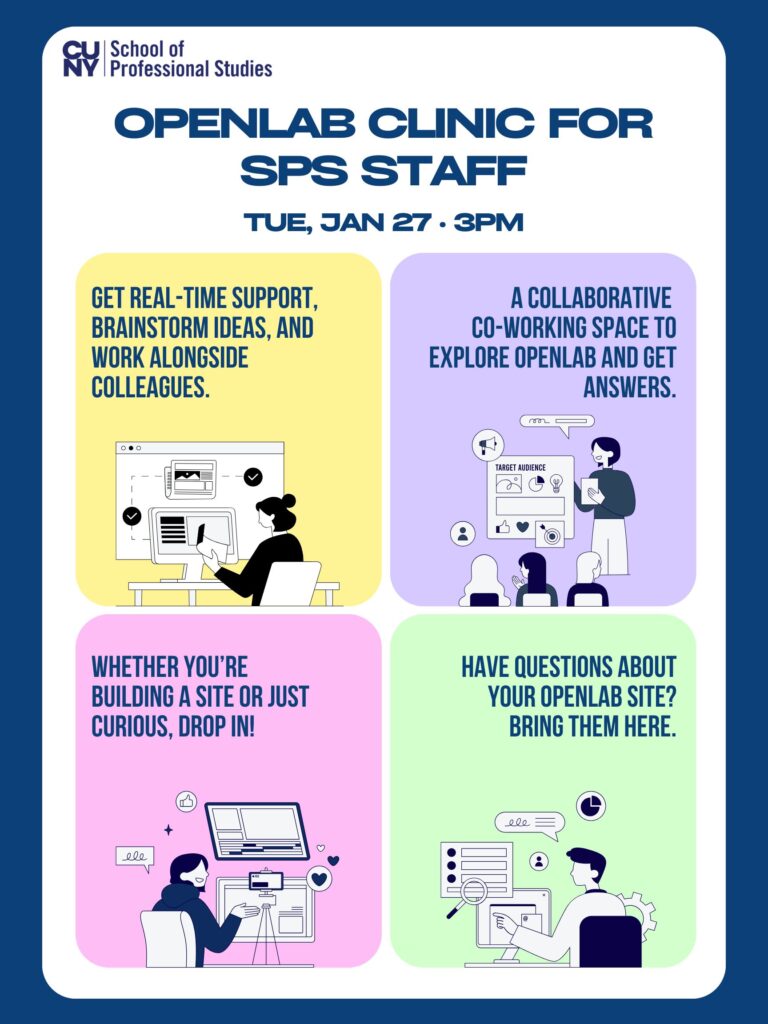
OpenLab Clinic for Staff

Come play, tinker, and get live feedback!

Join us for an OpenLab Clinic on Tuesday January 27 at 3 p.m. for an informal, hands-on session for SPS staff. Whether you’re building a new site, have questions, or just want to bounce around ideas, this is a space to collaborate, explore, and troubleshoot together. Drop in, co-work, or just come see what others are working on!

Register now!

Photo Credit: “unconventionalpaintings.com” by Carl Dunn, April 2017 via Flickr under the license CC BY-NC-SA 4.0.

« Older posts

© 2026 CUNY SPS Open Road

Theme by Anders Noren — Up ↑