
CUNY SPS Open Road

Where We're Going

Simple Accessibility Practices You Can Start Using Today on OpenLab

Accessibility does not always require special tools. Often, it starts with simple habits.

Here are a few easy practices you can apply to any OpenLab site:

  • Add clear alt text to every image describing what is shown
  • Use headings in order, starting with Heading 2 under your title
  • Avoid using color alone to communicate meaning
  • Write descriptive link text such as “View the final project report” instead of “Click here”
  • Break long paragraphs into shorter, readable sections

These small changes improve usability for screen reader users, mobile readers, and anyone scanning your content quickly.

Accessibility is about inclusion. When we design content with care, we create a more welcoming OpenLab community.

If you have questions about accessibility features or best practices, the OpenLab team is here to help.

Looking for more information? We got you!

Photo Credit: “abstract” by Cuba Gallery, June 2010 via Flickr under the license CC BY-NC-SA 4.0.

Making Your Site More Accessible with the Editoria11y Plugin

Did you know there’s a plugin on OpenLab that can quietly help make your site better for everyone?

It’s called the Editoria11y Accessibility Checker, and it works right inside the WordPress editor. As you build or update pages and posts, this plugin flags small issues that might make your content hard to access like missing alt text, unclear link labels, or color contrast problems.

You might also start seeing this plugin automatically when creating a new OpenLab site. Our upcoming site templates will have the Editoria11y Accessibility Checker already activated, making it easier for new sites to begin with accessibility in mind from the start.

What’s nice is that you don’t have to be a designer or a developer to use it. The plugin gives helpful explanations in real time and shows you where you can make quick changes. It’s kind of like having a friendly accessibility editor sitting next to you while you work.

This is especially useful if you’re creating a site for a project, club, or personal portfolio any space where others might visit and engage with your work. Making your site more accessible helps your ideas reach more people.

If you’re curious, the full plugin info is here, but the best way to try it is to activate it on your own site and explore.

Let us know if you want help getting started!

Looking for more information? We got you!

Photo Credit: “abstract” by Bahmad Farhan, August 2016 via Flickr under the license CC BY-NC-SA 4.0.

Spring 2026 OpenLab Support Schedule

Drop In, Connect, Create: OpenLab Support Hours Return for Spring 26

We’re excited to welcome you back for the Spring 2026 semester! Whether you’re setting up a new site, building a student portfolio, or just getting started on the OpenLab, we’re here to help.

Our Support Hours are casual, drop-in Zoom sessions where you can get help with anything OpenLab-related. Just bring your questions, ideas, or challenges, and we’ll walk through them together.

💡 During Support Hours, you can:

  • Get help setting up your project site
  • Learn how to use WordPress and OpenLab tools
  • Troubleshoot technical issues
  • Talk through ideas with the team
  • Co-work: make changes and additions to your OpenLab site and get immediate feedback and advice!

📣 Everyone is welcome: students, faculty, and staff. Whether you’re brand new or just need a refresher, we’re here to support you this spring.

For questions, reach out to us at openlab@sps.cuny.edu. We look forward to seeing you!

🗓️ Spring 2026 Schedule:

RECURRING SUPPORT

First two Mondays and last two Thursdays of each month, 6-7PM – all times listed in EST

Daytime sessions available by appointment HERE

Monday 1/26/2026 5-7PM

Thursday 1/29/2026 6-7PM

Monday 2/2/2026 6-7PM

Monday 2/9/2026 6-7PM

Thursday 2/19/2026 6-7PM

Thursday 2/26/2026 6-7PM

Monday 3/2/2026 6-7PM

Monday 3/9/2026 6-7PM

Thursday 3/19/2026 6-7PM

Thursday 3/26/2026 6-7PM

Monday 4/6/2026 6-7PM

Monday 4/13/2026 6-7PM

Thursday 4/23/2026 6-7PM

Thursday 4/30/2026 6-7PM

Monday 5/4/2026 6-7PM

Monday 5/11/2026 6-7PM

Photo Credit: “unconventionalpaintings.com” by Carl Dunn, April 2017 via Flickr under the license CC BY-NC-SA 4.0.

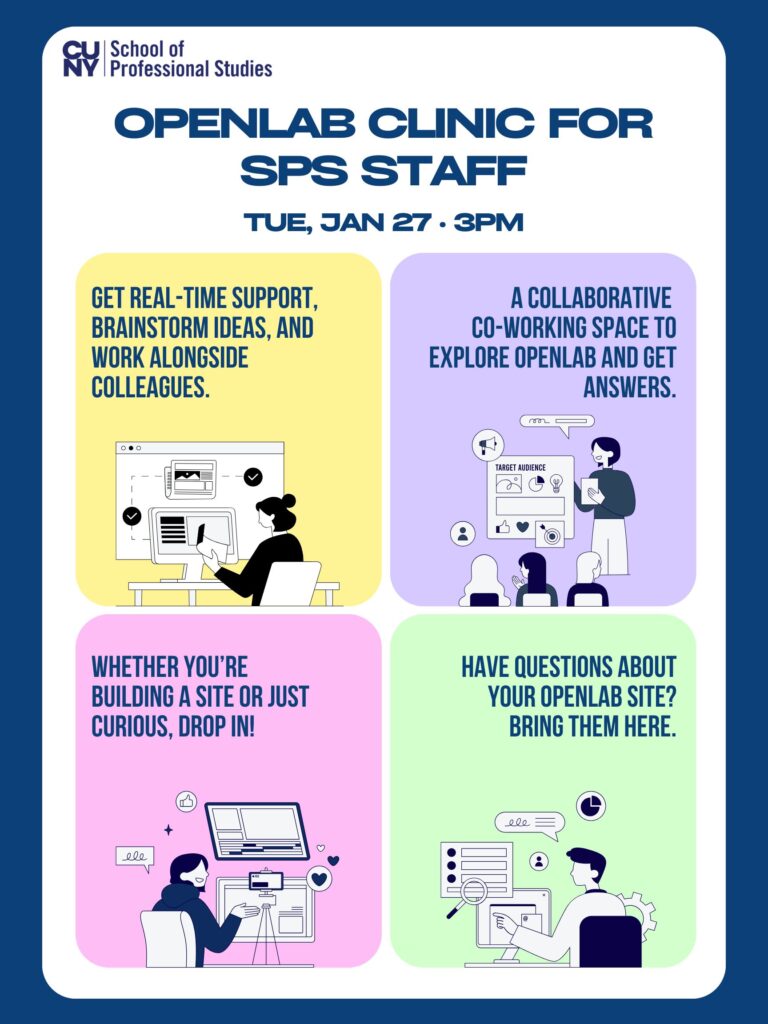
OpenLab Clinic for Staff

Come play, tinker, and get live feedback!

Join us for an OpenLab Clinic on Tuesday January 27 at 3 p.m. for an informal, hands-on session for SPS staff. Whether you’re building a new site, have questions, or just want to bounce around ideas, this is a space to collaborate, explore, and troubleshoot together. Drop in, co-work, or just come see what others are working on!

Register now!

Photo Credit: “unconventionalpaintings.com” by Carl Dunn, April 2017 via Flickr under the license CC BY-NC-SA 4.0.

Top 5 Features of OpenLab Every Student Should Use

If you’re a CUNY SPS student, OpenLab is your go-to platform for building connections, showcasing your work, and collaborating with classmates. But with so many features, where should you start? Here are the top 5 must-use features that will help you make the most of OpenLab!

1. Personal Portfolio

Want to stand out academically and professionally? OpenLab lets you create a personal portfolio where you can showcase your projects, coursework, and achievements all in one place. Think of it as your online resume!

2. Join Student Groups & Clubs

Connect with like-minded peers by joining student groups, academic organizations, and clubs. Whether you’re looking for study groups, networking opportunities, or social activities, OpenLab makes it easy to find your community.

3. Collaboration Spaces for Projects

Working on a group project? Need a space to brainstorm, share files, and discuss ideas? OpenLab provides dedicated collaboration spaces where students can work together efficiently, no endless email threads needed!

4. Learning & Resource Hubs

From study guides to academic support, OpenLab gives you access to valuable learning resources that can enhance your studies. Explore shared materials, faculty insights, and important updates, all in one convenient place.

5. Campus Announcements & Updates

Stay in the loop with the latest CUNY SPS news, events, and opportunities. OpenLab is a great place to find important updates, so you never miss out on deadlines, workshops, or community happenings!

Start Exploring Today!

Log in to OpenLab, explore these features, and make the most of your SPS experience. Your journey starts here!

Photo Credit: “unconventionalpaintings.com” by Carl Dunn via Flickr under the license CC BY-NC-SA 4.0.

Building Your Personal Portfolio on OpenLab

Want to showcase your work, track your progress, and stand out? OpenLab lets you create a personal portfolio where you can highlight projects, coursework, and achievements all in one place!

Why Build a Portfolio?

Display your best projects and assignments

Document learning experiences over time

Share your skills with employers & peers

How to Get Started

  • Log in to OpenLab with your CUNY credentials
  • Create a Portfolio – Go to My OpenLab > + Create a Portfolio
  • Customize It – Add your bio, upload a profile picture, and personalize your layout

Make It Stand Out!

Organize by categories (essays, projects, artwork)

Use visuals – Images, videos, or slides to enhance your work

Keep it updated – Add new work regularly!

Whether you’re looking to connect, collaborate, or lead, OpenLab is the perfect place to start.

Photo Credit: “Abstract Wall” by casellx via Flickr under the license CC BY-NC-SA 4.0.

Fall 2025 OpenLab Support Schedule

Drop In, Connect, Create: OpenLab Support Hours Return for Fall 2025

Welcome back to CUNY SPS’s only collaborative digital community platform!

The CUNY SPS OpenLab team is excited to announce the return of our Support Hours for the Fall 2025 semester! Whether you’re a student exploring digital tools, a faculty member building your research portfolio site, or a staff member looking to enhance your online presence, our virtual drop-in sessions are here to support your journey on the OpenLab.

These informal, come-as-you-are sessions are designed to provide flexible, real-time support for all members of the CUNY SPS community. No appointment necessary—just bring your questions, ideas, or curiosity. Feel free to register to receive a reminder email! Whether you’re troubleshooting a technical issue, seeking design feedback, or simply want to brainstorm with the OpenLab team, we’re here to help.

🗓️ Fall 2025 Schedule:
Unstructured Support Hours will be held via Zoom. Check the SPS OpenLab Events Calendar for the most up-to-date schedule and links.

💡 What You Can Do During Support Hours:

  • Get help customizing your course or project site
  • Learn how to use OpenLab tools more effectively
  • Explore digital pedagogy strategies
  • Connect with other OpenLab users and share ideas

📣 Join us this fall and make the most of what OpenLab has to offer! Whether you’re just getting started or looking to take your site to the next level, our team is here to support you. Drop in, ask questions, and get inspired.

For more information, visit the SPS OpenLab Support page or email us at openlab@sps.cuny.edu.

Let’s build something great—together.

Register or Plan to Join

Monday 8/25/25 4-6PM

Tuesday 8/26/25 6-7PM

Thursday 9/4/25 3-5PM

Monday 9/8/25 6-7PM

Tuesday 9/16/2025 6-7PM

Tuesday 9/23/2025 3-4PM

Monday 9/29/2025 6-7PM

Tuesday 10/21/2025 6-7PM

Monday 10/27/2025 6-7PM

Monday 11/10/2025 6-7PM

Monday 11/24/2025 6-7PM

Featured image by Carl Dunn, February 2, 2018 CC BY-NC-SA

Congratulations, Graduates!

To all the CUNY SPS graduates: we see you, and we’re cheering you on.

Finishing your degree is no small thing. It takes commitment, resilience, creativity, and a whole lot of behind-the-scenes effort that often goes unnoticed. This is your moment to recognize everything you’ve done and everything you’ve become on the way here.

Wherever you’re headed next, remember:

  1. You’ve already built so much (maybe even on OpenLab!)
  2. Your projects, reflections, and collaborations have shaped a path that’s uniquely yours
  3. The work you’ve shared here isn’t just “school work” it’s part of a growing professional story you can carry forward

We hope you take a moment this week to celebrate your journey and maybe archive a few pieces of it on your OpenLab space to look back on someday.

From all of us at the OpenLab team: Congratulations! You did it. 🎉

If you ever want to keep building or stay connected as an alum, we’re here.

📩 openlab@sps.cuny.edu

Finals Are Over. Now What?

So…you made it. Finals are done. The adrenaline’s fading. You might be feeling exhausted, wired, numb, or just… blank.

That’s normal.

Here are a few things you don’t have to do right now:

  • Be productive
  • Plan your whole future
  • “Catch up” on everything you postponed

Instead, try one of these:

  • Do absolutely nothing for a bit (yes, really)
  • Take a walk without a podcast or a plan
  • Reorganize your OpenLab site if that sounds fun, or don’t touch it at all
  • Text that classmate you actually liked talking to
  • Write something just for you, not for a grade

Recovering from finals isn’t about bouncing back immediately. It’s about making space. Space to feel how you feel, and to remember what it’s like to do things for yourself again.

We’re proud of you. Take your time.

– The OpenLab Team

Photo Credit: “Summer’s almost gone” by Frinn Frode via Flickr under the license CC BY-NC-SA 4.0.

Building, Joining, and Participating in Student Organizations via OpenLab

Getting involved in student organizations is one of the best ways to connect with peers, build leadership skills, and engage with topics that interest you. OpenLab makes it easy to find, join, or even create your own student groups at CUNY SPS.

Why Join or Start a Group?

  • Expand your network while connecting with classmates who share your academic or personal interests.
  • Participate in discussions while collaborating on projects and sharing valuable resources.
  • Gain leadership experience while organizing events, managing a group, and building a community.
  • Stay informed while receiving updates on campus activities, career opportunities, and academic support.

How to Get Involved

  • Explore existing groups while browsing OpenLab’s Groups section to find student clubs, academic organizations, and project teams.
  • Join discussions while introducing yourself, engaging with posts, and contributing ideas.
  • Create your own group while setting up a space for discussions, collaboration, and resource sharing on topics that matter to you.
  • Stay active while posting updates, sharing insights, and inviting peers to participate.

Whether you’re looking to connect, collaborate, or lead, OpenLab is the perfect place to start.

Photo Credit: “Magic&Loss” by livingtheliminal via Flickr under the license CC BY-NC-SA 4.0.

« Older posts

© 2026 CUNY SPS Open Road

Theme by Anders NorenUp ↑