Dear Colleagues,
As you have heard, new federal and NY State regulations require higher‑education institutions like CUNY to ensure that online course materials meet WCAG accessibility standards by April 24, 2026. Thanks to your dedication, we here at CUNY SPS have built a good foundation in our online courses, but this is our opportunity to Level Up! and make our online learning environment even more accessible and inclusive for all students.
This spring semester, we will focus on several key accessibility practices that make an immediate difference for learners, including:
- Captioning and transcripts for video and audio
- Alternative text for images
- Color contrast
- Improved document formatting and heading structure
- Replacing or remediating scanned PDFs
- Accessible syllabi
To support you, OFDIT is launching a set of resources and activities as part of the Level Up! campaign:
Ally Widget in Brightspace Courses
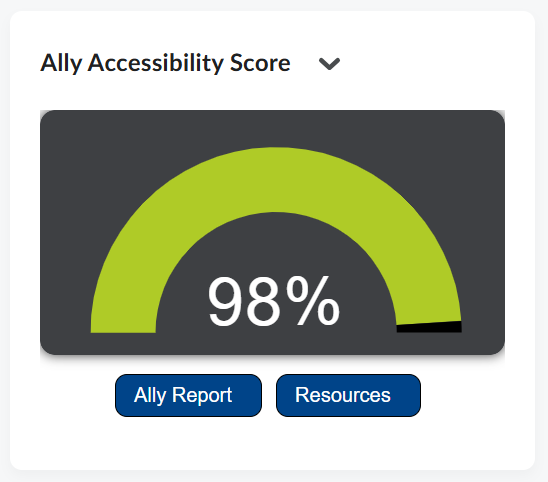
Next week you will see a new widget on your course home page that displays an accessibility score for your course content, as reported by Ally, an accessibility tool built into our Brightspace Learning Management System.
Below the score you will see links to the full Ally report for the course and to our Level Up! accessibility resource page (this site).
Join the Accessibility Challenge March 2 – 27
Sign up for the challenge by enrolling in the Accessibility Challenge Brightspace site. Every week you’ll receive 2 prompts with a focused accessibility tip, a quick action you can take in your course, and a recommendation for future planning. You can also earn a certificate for completing the challenge. The first tip will be about the Ally score and report, so it’s a quick and easy way to start levelling up! Visit the Challenge information page for more information.
Attend Trainings and Workshops
CUNY CIS Training is offering a series of workshops on accessibility. This series includes 7 webinars focused on accessibility best practices, tools, and techniques to make your content usable for everyone.
- Accessibility Basics: Why it Matters (3/3)
- Creating Accessible Word Documents (3/16)
- Designing Accessible PowerPoint presentations (3/18)
- Building Accessible Excel Spreadsheets (3/3, 3/24)
- Ensuring Accessibility in Brightspace (3/5, 3/26)
- Writing Effective Alternative Text (3/9, 3/30)
- Making PDFs Accessible with Adobe Acrobat (3/11, 4/1)
View full descriptions and register here (Login required using your @login.cuny.edu account)
OFDIT is also offering sessions on Anthology Ally: An Introduction
Learn how Anthology Ally can increase access and improve the overall learning experience in your course by providing choice and flexibility for how students consume content and access media. We will cover both alternative file formats and the accessibility gauge features that are now available to all in your courses and the support Ally provides in addressing any areas where accessibility can be improved, often very quickly!
- Wednesday, March 11 at 10:00am – Register Here
- Friday, March 20 at 10:00am – Register Here
Explore the Accessibility Project Site
Visit our Level Up! accessibility webpage for information, resources, and links to tools that can help you strengthen accessibility in your courses.
Thank you for your continued commitment to creating a learning environment where all students can fully participate from day one. We’re excited to partner with you as we Level Up! accessibility across CUNY SPS courses.
Best,
Your OFDIT Team
Office of Faculty Development and Instructional Technology

Leave a Reply