



Remote Production Workflow
- Reach out to the Media Team: Working with the Media Team begins with an email inquiry and/or an optional consultation. In the email briefly describe your video project.
- Decide the goal and write a script: It’s good practice to define the goal of your video first, before you draft a script. Once decided, write the script. Check out our script writing tips for more on the topic. We also have some tips on using Gen AI tools to co-write video scripts, if desired.
- Request feedback: With a draft script in hand, you’re welcome to request feedback from the Media Team. We will review it and make suggestions for maximum engagement. Our goal is a clear, concise script that is ready for production.
- Select a Visual Template: How would you like the presentation slides to look and feel? Review the gallery of templates and tell the Media Team the name of the template you prefer.
- Record yourself: Once your script is finalized, record it at home. See below for tips on at home recordings. The Media Team will prepare a PowerPoint slide deck based on your final script. All faculty are welcome to schedule an in‑studio session, if possible. Otherwise, share the recording with the Media Team.
- Post-Production (editing): The Media Team will prepare a PowerPoint slide deck based on your final script after we receive your recording. We also enhance the audio and finish with a draft video for your review.
- Review/Approve the video: The Media Team will send you the draft video and ask you to to review and approve. You are welcome to request changes at this point. With your approval, we’ll add professional captions, publish the final version in Brightspace, and transfer ownership of the video to you.
Record at Home Best Practices
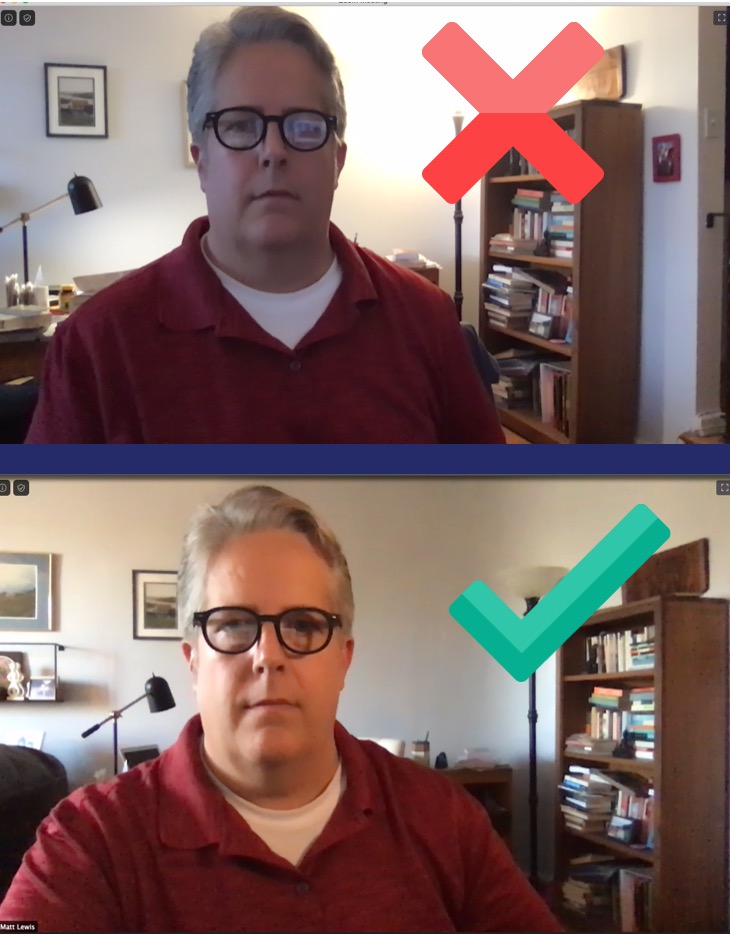
Recording at home means you make all the decisions on framing, eye line, lighting and shot composition. Review our teaching guide for practical steps to Make Quality Video Recordings you can use with any device, along with examples that show how these choices shape a student’s viewing experience. These tips will help you produce a polished, engaging result.
Request a Media Consultation
Faculty creating video for SPS courses may request a 30‑minute consultation with Matt Lewis, the Media Team Lead. In this meeting, we define the goal of your production and review the workflow, including roles, timelines, and required materials. Consultations take place on Zoom to support faculty working remotely. To schedule a session, email FacultySupport@sps.cuny.edu with a brief description of your project and your availability. The Media Team will reply with next steps and recommended resources.
