Help for Students
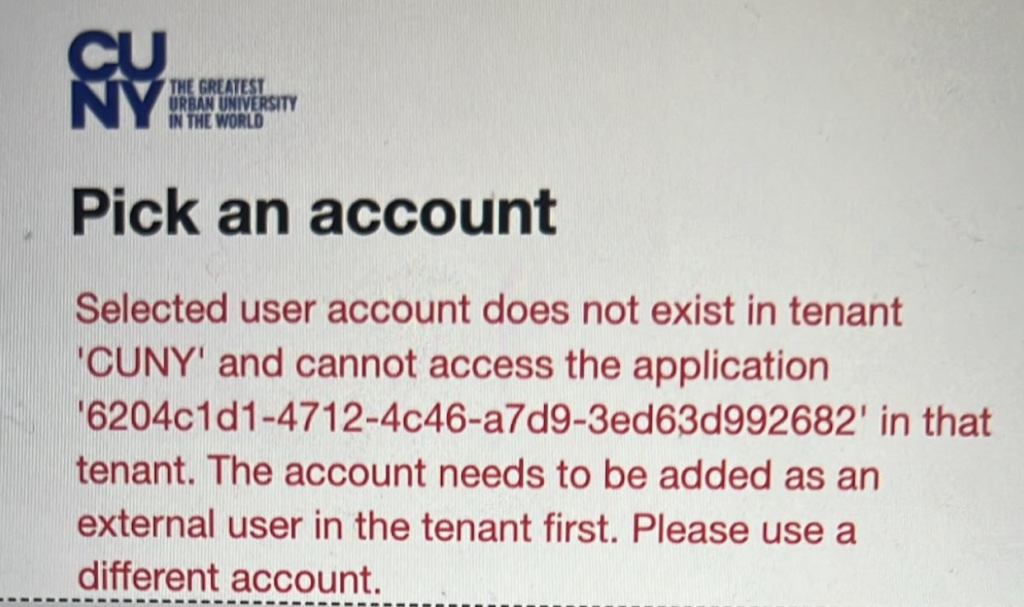
Are you receiving a message similar to this one?
If you follow the link in your email to approve the agreement, but then see a message saying your user account does not exist in the tenant and cannot access the application, you are likely not logged into your CUNY Microsoft Office 365 account. Please take the following steps:
- Open a different internet browser or private/incognito window.
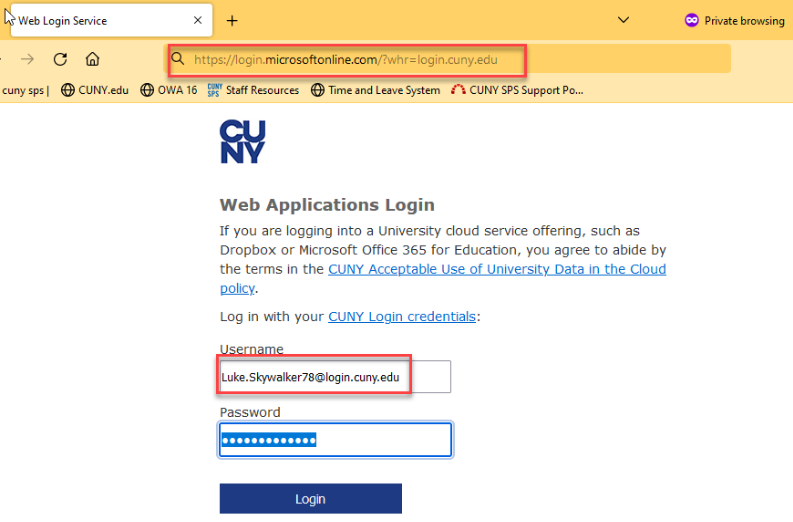
- Go to CUNY’s Office 365 login page using this link:
https://login.microsoftonline.com/?whr=login.cuny.edu
- Username: Firstname.Lastname00@login.cuny.edu
Make sure you use your CUNY Login (NOT YOUR EMAIL ADDRESS). It is FirstName.LastName00 (last two digits of your CUNYfirst ID), then @login.cuny.edu (instead of spsmail.cuny.edu). It is the same account and password you use to log into Brightspace, Blackboard and CUNYfirst. You may want to type in the information in case you have saved passwords on your computer.
- Once you are logged into the CUNY MS Office365 account, please try the link from the email again.
Still having trouble? Contact the CUNY SPS campus help desk.
Help for Faculty
Need help locating the student’s EmplID? It is an 8-digit number that is the same as the Brightspace ID. This can be found in Tools> Classlist (see the column Org Defined ID), or in Tools> Class Progress.
Further information
If you have questions about the incomplete process, contact your faculty, program, or advisor as appropriate.
Was this helpful?
0 / 0
